
If your item is no longer available or you no longer wish to display your ad, you can easily delete it from your account.
📌 Step-by-Step Guide to Delete Your Ad
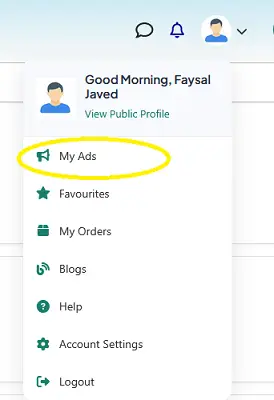
1. Go to “My Ads”
- Log in to your Exchstore account
- Click on your profile icon (top right corner)
- Select My Ads
2. Find the Ad You Want to Delete
- Browse your list of active ads
- Locate the specific ad you want to remove
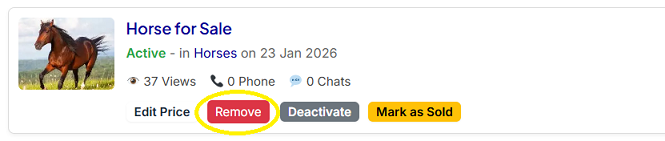
3. Click on “Remove”
- Under your ad, click the Remove button
- (As shown in your screenshot next to “Edit Price”)
4. Confirm Deletion
- A confirmation message may appear
- Click Confirm to permanently delete your ad
⚠️ Important Notes
- Once deleted, the ad cannot be recovered
- All ad data (price, images, description) will be permanently removed
- If your item is already sold, it’s better to use Mark as Sold instead of deleting
💡 Pro Tips
- Use Deactivate if you want to hide your ad temporarily
- Use Mark as Sold to build trust with buyers
- Delete ads only when they are no longer needed