
Adding the correct location helps buyers find your ad easily and improves trust and response rates.
📌 When Can You Add Location?
You can add your location while posting a new ad.
👉 Currently, location cannot be edited after publishing (until future updates).
✅ Step-by-Step Guide to Add Location
1. Click on “Post New Ad”
- Log in to your Exchstore account
- Click on the SELL button
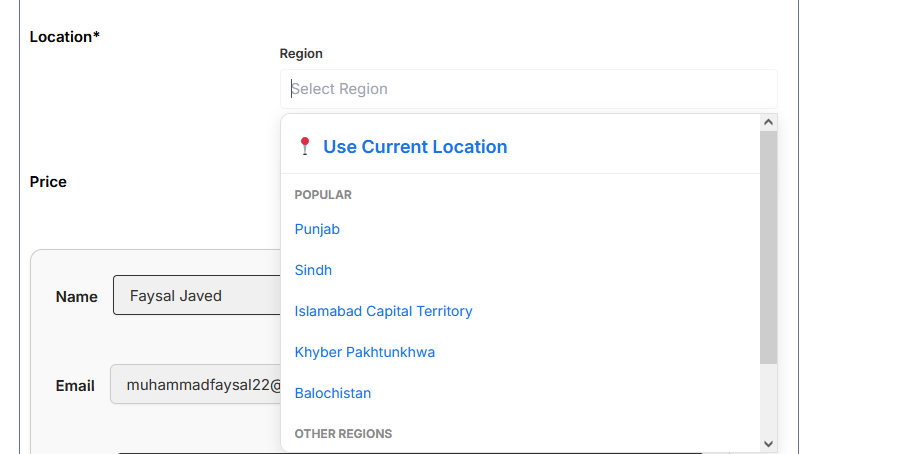
2. Find the Location Field
- While filling ad details, locate the Location section
3. Enter Your Location
- Type your:
- City (e.g., Faisalabad, Lahore, Karachi)
- Area (optional, if available)
4. Select from Suggestions
- Choose the correct location from dropdown suggestions (if enabled)
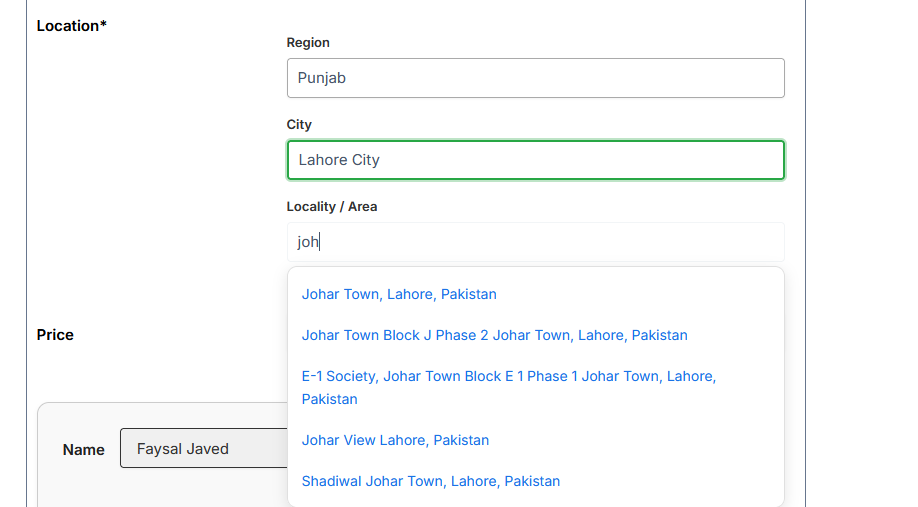
5. Complete and Post Your Ad
- Fill remaining details
- Click Post Ad to publish
⚠️ Important Notes
- Location cannot be changed after posting (currently)
- Make sure your location is accurate before submitting
- Wrong location may reduce visibility or trust
💡 Tips for Better Results
- Use your exact city for better reach
- Add area/region if available for more precise targeting
- Avoid using fake or misleading locations