
The easiest way to find products is by using the main search bar on the homepage.
Steps to Search
- Open Exchstore Homepage
- Click on the search bar.
- Type the product name you want to find.
Example Searches
- iPhone
- Honda Civic
- Laptop
- Sofa
- Bike
- Press the Search button or hit Enter.
- Browse the available ads and open the listing you like.
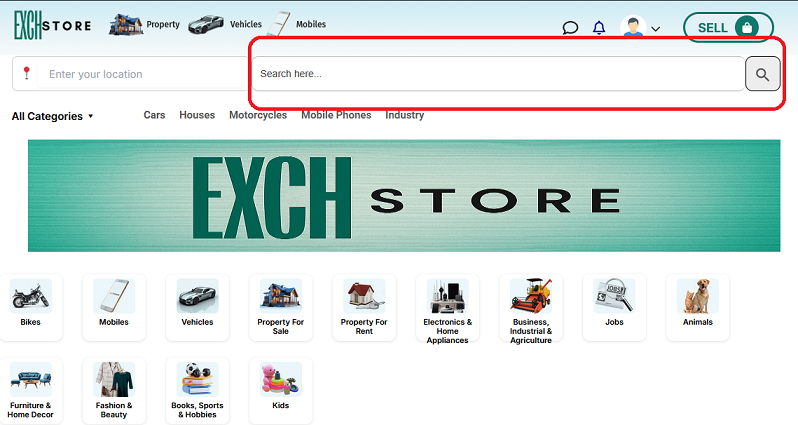
Browse Products by Categories
Exchstore offers multiple categories to help users quickly find relevant products.
Popular Categories
- Mobiles
- Vehicles
- Property for Sale
- Property for Rent
- Electronics & Home Appliances
- Fashion & Beauty
- Furniture & Home Decor
- Bikes
- Kids
- Jobs
- Animals
- Books, Sports & Hobbies
- Business, Industrial & Agriculture
Selecting the correct category improves search accuracy and shows more relevant ads.
Use Filters for Better Results
Filters help narrow down search results and save time.
Available Filters
- Location
- Price Range
- Condition (New or Used)
- Category
- Posted Date
Example
If you want a used iPhone in your city within your budget, simply apply the filters after searching.
Search Products Near Your Location
You can search products available in your city or nearby areas.
How to Search by Location
- Select your city or area.
- Enter the product name.
- Browse local ads for easier communication and faster deals.
Searching locally helps buyers meet sellers quickly and reduce delivery issues.
Tips for Better Search Results
Helpful Search Tips
- Use simple and clear keywords.
- Avoid spelling mistakes.
- Try different search terms if needed.
- Select the correct category.
- Use filters to narrow results.
- Check recently posted ads regularly.