
Keeping your ad updated helps attract more buyers and improves your chances of making a sale. On Exchstore, you can currently edit your ad price easily, with more editing features coming soon.
📌 Step-by-Step Guide to Edit Your Ad
1. Go to “My Ads”
- Log in to your Exchstore account
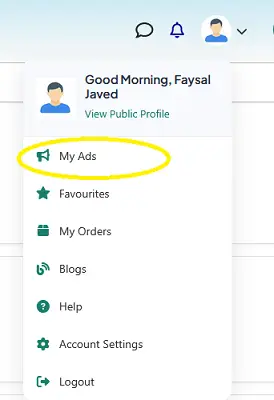
- Click on your profile icon (top right corner)
- Select My Ads
2. Find Your Ad
- You will see a list of all your active ads
- Locate the ad you want to update

3. Click on “Edit Price”
- Under your ad, click the Edit Price button
- (As shown in your screenshot)
4. Update Your Price
- Enter the new price
- Save/confirm your changes
⚠️ Important Note
Currently, only the price editing option is available on Exchstore.
👉 You cannot edit the following yet:
- Ad title
- Description
- Images
- Location
- Category
These advanced editing options will be added in future updates.
💡 Pro Tips
- Keep your price competitive to get more views
- Update your price regularly if your ad is not getting responses
- Use Mark as Sold once your item is sold to maintain trust